Convert guest orders into registered customer accounts with a single click
What is this plugin?
WooCommerce Create User from Guest Orders is a lightweight plugin that allows store administrators to convert guest orders into registered customer accounts directly from the WooCommerce Edit Order screen. With a single click, you can create a new user account using the customer’s billing and shipping information, making it easier to manage customer relationships and provide a better shopping experience.
Key Features
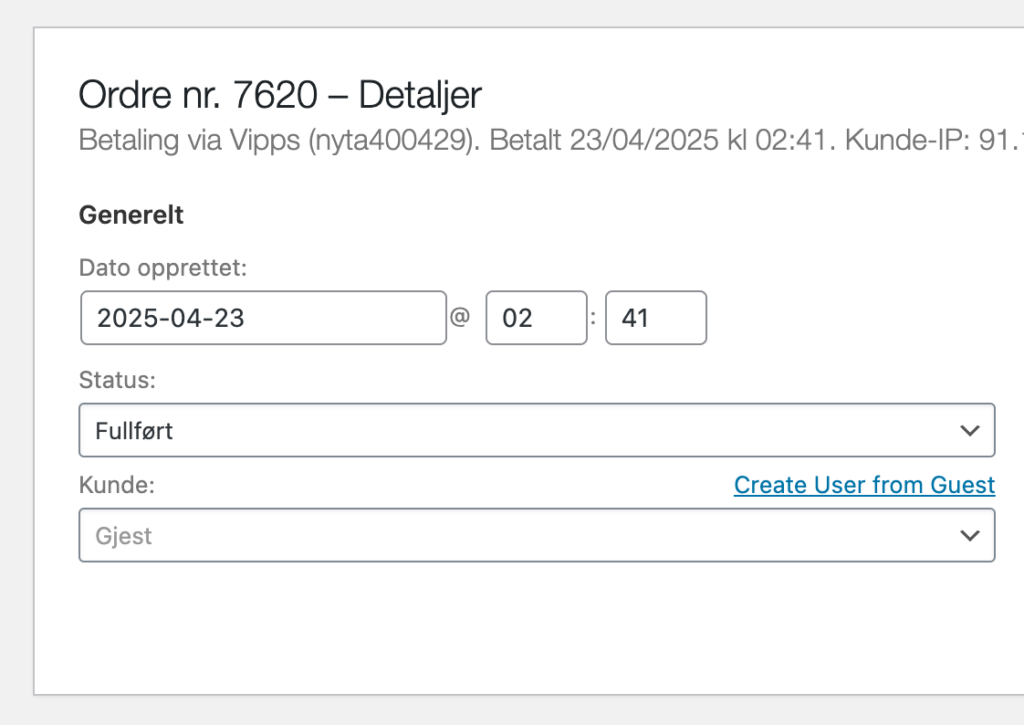
- One-Click User Creation: Add a “Create User from Guest” button in the WooCommerce order edit screen.
- Email Control: Choose whether to send login credentials to the new user.
- Smart Username Generation: Creates usernames in the format firstname.lastname with proper handling of Norwegian characters (æ→ae, ø→oe, å→aa).
- Complete Customer Data: Saves all billing and shipping information to the new user account.
- Order Reassignment: Automatically finds and reassigns other guest orders with the same email address.
- Clear Feedback: Shows success messages with details about the operation.
How It Works
- Navigate to a WooCommerce order that was placed by a guest
- Look for the “Create User from Guest” link next to the customer field
- Click the link and choose whether to send login credentials to the user
- The system will create a new user account, assign it to the current order, and reassign any other guest orders with the same email
Upcoming Features
- Bulk Guest Account Creation: Create multiple user accounts from guest orders at once.
- Update User Address on New Order: Automatically update user address information when they place new orders.
- Button in Order List: Add the create user button directly in the orders list for quicker access.
Installation
- Upload the
woocommerce-create-user-from-guestfolder to the/wp-content/plugins/directory - Activate the plugin through the ‘Plugins’ menu in WordPress
- Navigate to any guest order in WooCommerce to see the “Create User from Guest” button
Requirements
- WordPress 5.0 or higher
- WooCommerce 4.0 or higher
- PHP 7.2 or higher
Open Source
This plugin is open source and available on GitHub. Contributions are welcome!
Developed by Lasse Jellum | Version 1.0.0